You write:
Make the application more minimalistic. Add a dark mode and improve the appearance of the buttons.
Want another feature?
Add due dates and allow users to filter tasks by status.
AI modifies the application again.
That is, in simple terms, what vibe coding is all about.
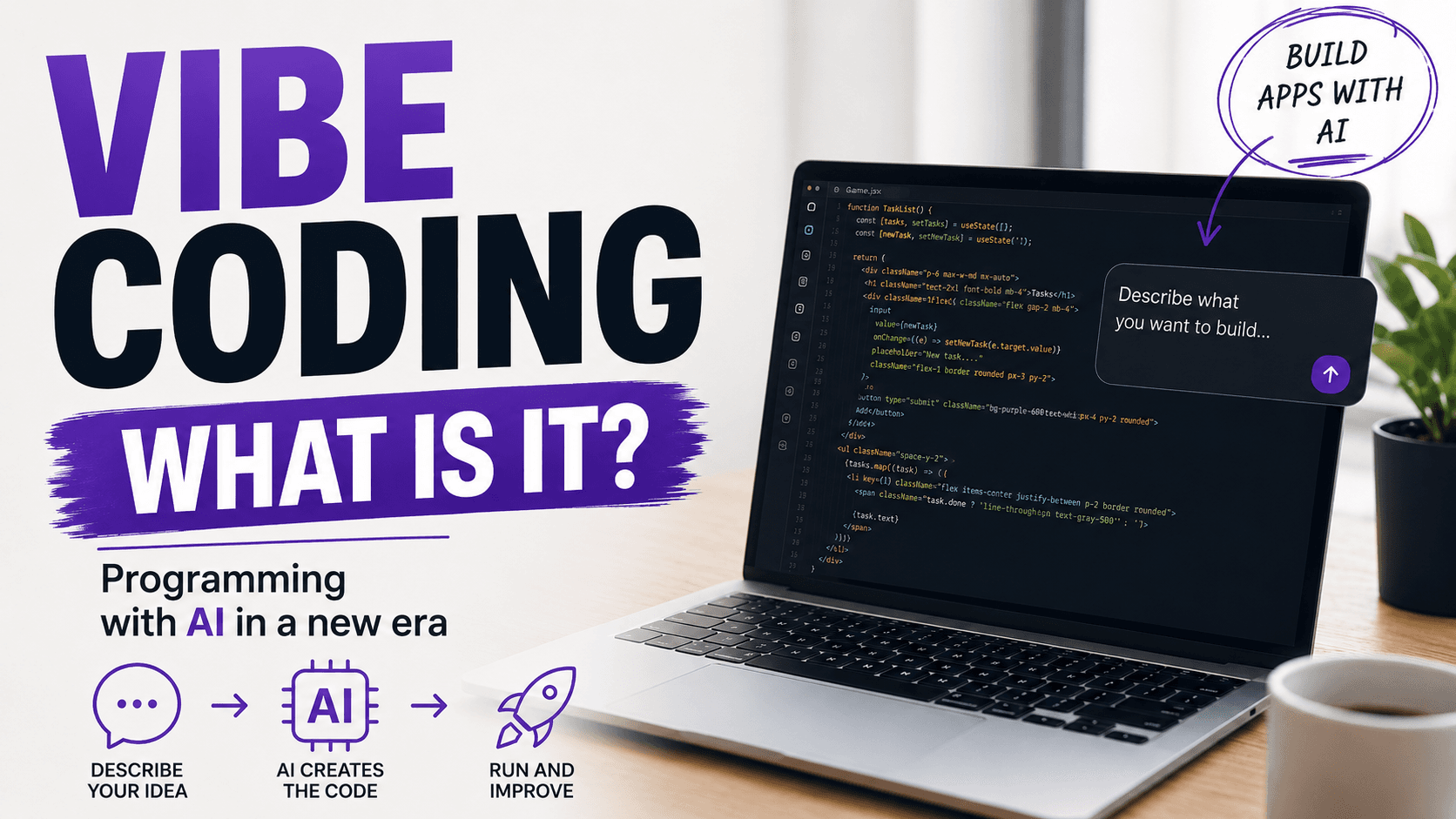
Vibe coding is an approach to software development where, instead of manually writing every line of code, you describe the desired outcome in natural language and let artificial intelligence handle a significant part of the technical implementation.
The term became popular in 2025 and quickly became part of the broader discussion around AI-assisted software development.
Where Did the Term Vibe Coding Come From?
The term vibe coding was popularized by Andrej Karpathy, an AI researcher, former Director of AI at Tesla, and co-founder of OpenAI.
In February 2025, he described a new way of programming where developers focus more on the desired outcome while allowing AI models to take over a large part of the actual coding process.
The term spread very quickly.
Today, vibe coding is used in a broader sense.
It often refers to building applications through a conversation with AI.
You describe your requirements, review the result, provide feedback, and improve the application step by step.
The focus starts to shift from:
How do I write this code?
to:
What do I actually want to achieve?
How Does Vibe Coding Work?
A typical vibe coding workflow can be surprisingly simple.
1. Describe Your Idea
You start by explaining what you want to build.
For example:
I want to create an application for managing a household budget. Users should be able to add income and expenses, assign categories, and view a monthly summary.
At this stage, you do not necessarily need to define classes, functions, libraries, or the project structure.
You describe the outcome.
2. AI Creates the First Version
An AI agent or coding assistant can then:
- create the project structure,
- build the user interface,
- generate code,
- create components,
- add application logic,
- connect a database,
- generate basic tests,
- identify and fix some errors.
Modern AI tools can already perform several of these tasks within a single workflow.
3. Review the Result
Next, you run the application.
You check whether it behaves the way you expected.
And this is where one of the most important parts of vibe coding begins.
Vibe coding does not mean entering one prompt such as:
Build me an application.
and blindly accepting whatever the AI generates.
In practice, multiple iterations are usually required.
4. Ask for Changes
You might write:
The login button is too large. Make it smaller and center it below the form.
Or:
When the user enters an incorrect password, no error message appears. Add a clear error message.
The AI analyzes the project and makes another set of changes.
The workflow looks roughly like this:
idea → prompt → code → run → review → correction → new prompt
This cycle continues until the result matches your expectations.
Do You Need to Know Programming to Use Vibe Coding?
This is one of the most interesting questions.
Not always.
Vibe coding significantly lowers the barrier to software development.
Someone who does not know JavaScript, TypeScript, or Python can now create a basic website, dashboard, form, or even an application prototype by working with AI.
That does not mean technical knowledge has become unnecessary.
Quite the opposite.
The more complex the project becomes, the more useful it is to understand areas such as:
- web development,
- databases,
- APIs,
- security,
- software architecture,
- testing,
- Git,
- cloud technologies,
- performance,
- clean code and best practices.
A person without technical experience can often build a prototype very quickly.
The challenges start when the application needs to handle real users, payments, sensitive information, or large volumes of data.
Which Tools Can Be Used for Vibe Coding?
The market for AI development tools is growing extremely quickly.
Some of the most popular tools include:
Cursor
Cursor is a code editor designed around AI-assisted development.
You can discuss your project with AI, generate code, modify existing code, and make changes across multiple files.
GitHub Copilot
GitHub Copilot is no longer just a tool for suggesting individual lines of code.
Modern Copilot features support much more agentic workflows.
AI can analyze larger tasks, plan changes, implement features, and help developers work across more complex parts of a project.
Replit
Replit strongly focuses on building applications through interaction with an AI agent.
You describe what you want to create, and AI helps build, run, improve, and deploy the application.
Lovable
Lovable allows users to create web applications based on natural-language descriptions.
You describe the design and functionality you want, the tool generates a working first version, and you improve it through additional prompts.
These are only a few examples.
The AI coding market is evolving extremely quickly.
What Can You Build with Vibe Coding?
Modern AI tools can be used to create projects such as:
- websites,
- landing pages,
- portfolios,
- simple online stores,
- task management applications,
- dashboards,
- reporting tools,
- applications using APIs,
- internal company tools,
- simple SaaS products,
- registration forms,
- booking systems,
- AI-powered applications,
- startup prototypes,
- extensions for existing applications.
Vibe coding is particularly useful when building an MVP, or minimum viable product.
Instead of spending several weeks building an initial prototype, it may be possible to create a basic working version much faster.
Vibe Coding vs Traditional Programming
Does vibe coding mean the end of traditional software development?
No.
What is changing is the way developers work.
In a traditional development process, a programmer may manually create:
- the application structure,
- components,
- functions,
- API calls,
- tests,
- configuration.
With an AI-assisted workflow, more tasks can be described at a higher level.
Instead of implementing a function step by step, a developer might write:
Create a REST endpoint that returns the current user's orders. Add error handling and unit tests.
AI then creates the first implementation.
The human role increasingly shifts toward:
- defining problems,
- specifying requirements,
- making decisions,
- evaluating solutions,
- testing software,
- checking security,
- controlling quality.
That is a major change.
Developers may spend less time typing every line of code and more time managing the overall software development process.
Vibe Coding vs No-Code – Are They the Same?
No.
Traditional no-code platforms also allow people to build applications without conventional programming.
However, no-code usually relies on predefined building blocks.
You drag a component onto the screen.
You add a form.
You connect it to a database.
You configure actions.
Vibe coding works differently.
You communicate with AI, and the system may generate regular application code behind the scenes.
This provides much more flexibility.
For example, you can write:
Add a points system. A user should receive 10 points for each completed task, but no more than 100 points per day.
AI can implement the required logic without relying on a prebuilt component designed for that exact scenario.
The Biggest Advantages of Vibe Coding
Speed
The distance between an idea and a working prototype can become much shorter.
Lower Barrier to Entry
You do not need to understand every technology used in the project before getting started.
Faster Experimentation
Have an idea?
You can test it quickly.
If it does not work, you can change direction without spending several days implementing the first version manually.
Automation of Repetitive Tasks
AI can handle many repetitive tasks involved in software development.
More Focus on the Product
Instead of spending an hour trying to remember the syntax of a particular library, you can focus on the bigger question:
What should the product actually do?
What Are the Risks of Vibe Coding?
Vibe coding also has important limitations and risks.
AI Can Generate Incorrect Code
Code may look correct and work in basic scenarios while still containing hidden problems.
Security Issues
The risk becomes much greater when AI-generated code is used without proper review in applications that handle:
- personal information,
- authentication,
- payments,
- API tokens,
- internal company data.
Maintainability Problems
If you continuously accept AI-generated changes without understanding the project structure, you may eventually end up with a large codebase that nobody fully understands.
AI Does Not Always Understand the Full Context
A solution may work technically while still failing to meet the actual business requirements.
That is why humans remain a critical part of the development process.
Will Vibe Coding Replace Programmers?
This question cannot be answered with a simple yes or no.
A more realistic scenario is that vibe coding will change how developers work.
Modern IDEs did not eliminate programmers.
Stack Overflow did not eliminate programmers.
GitHub Copilot did not eliminate programmers either.
However, AI enables a much higher level of automation than many previous tools.
As a result, developers may increasingly stop writing every line of code manually.
Skills such as the following may become even more important:
- understanding software architecture,
- solving complex problems,
- analyzing requirements,
- designing systems,
- testing software,
- evaluating security,
- critically reviewing AI output,
- communicating effectively with AI agents.
Programming knowledge may actually become an even greater advantage.
Two people can use exactly the same AI tool.
One person accepts everything the model generates.
The other notices problems with architecture, security, performance, and code quality.
That difference can be extremely important.
Is Vibe Coding Worth Learning?
Yes.
And not only for beginners.
Experienced developers can benefit from it as well.
Vibe coding should not be viewed only as a way for non-programmers to build applications.
It can also be an effective way to significantly speed up the work of technical professionals.
Developers can use AI for:
- rapid prototyping,
- generating boilerplate,
- creating tests,
- refactoring,
- writing documentation,
- analyzing bugs,
- implementing simple features,
- learning new technologies.
The key is to remain in control of what AI produces.
Conclusion
Vibe coding is one of the most interesting developments in software engineering in the age of artificial intelligence.
Instead of writing every line of code ourselves, we describe the result we want to achieve.
AI generates a solution.
We run it, review it, and ask for additional changes.
Software development becomes increasingly conversational.
That does not mean quality, security, and testing are suddenly less important.
The more important and complex an application becomes, the more important it is to verify what AI generates.
One thing is clear.
The barrier between an idea for an application and working software is much lower today than it was just a few years ago.
That is why it is worth learning to use AI not only as a tool for answering questions, but as a tool for planning, building, and improving real software.
Vibe coding probably does not mean the end of programming.
It may, however, mark the beginning of a completely new way of programming.