Best AI Tools in 2026 – Quick Overview
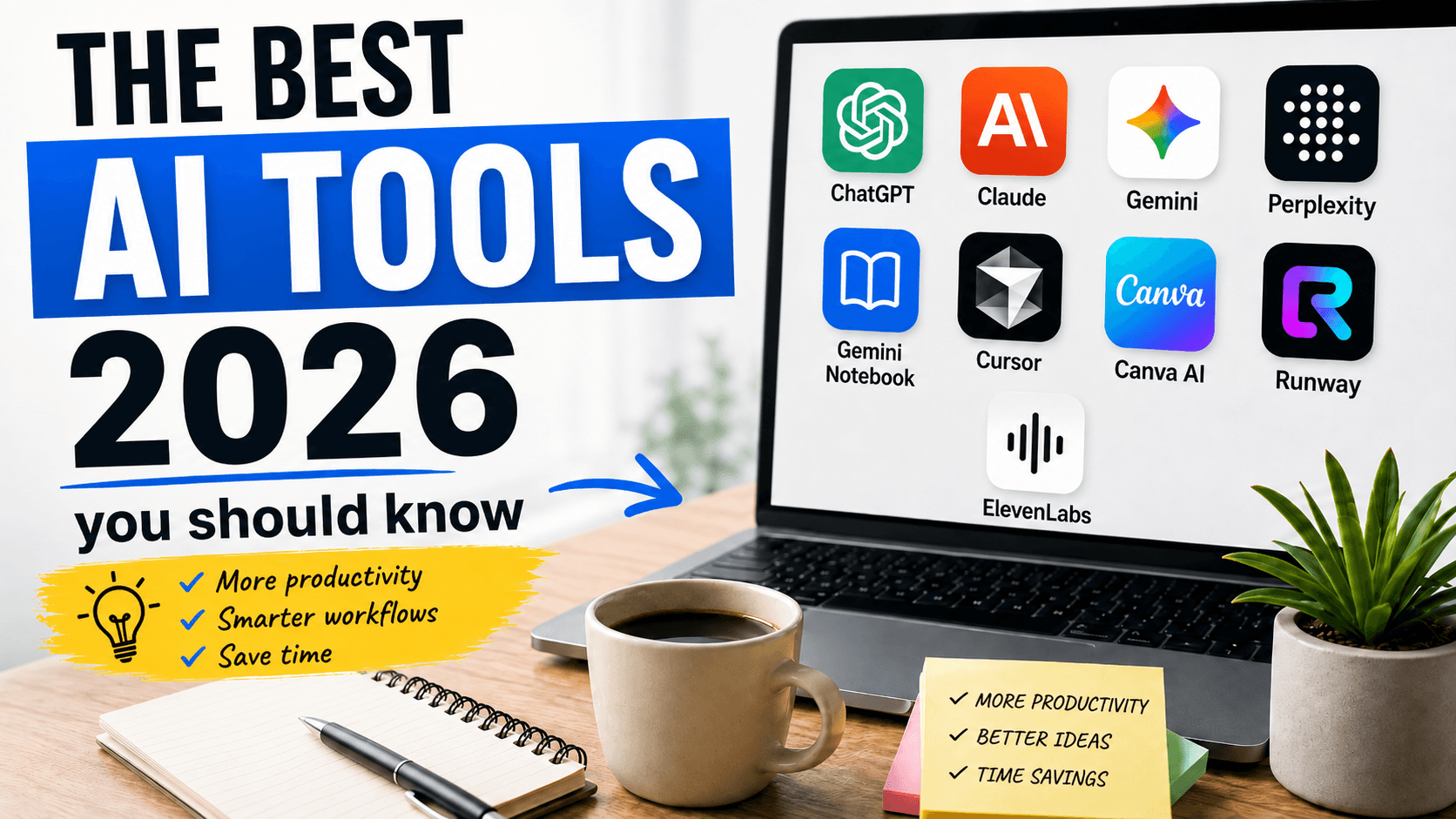
If you need a versatile AI assistant for many different types of tasks, ChatGPT, Claude, and Gemini are among the first tools worth exploring.
For online research and finding information, Perplexity is particularly interesting.
People who study or work with large amounts of their own documents should take a closer look at Gemini Notebook.
Developers should consider Cursor.
For graphics, presentations, and marketing materials, Canva AI is one of the easiest tools to start with.
For video generation and editing, Runway remains one of the most recognizable platforms.
And if you create voiceovers, online courses, podcasts, or other audio content, ElevenLabs is definitely worth knowing.
Let us take a closer look at each of these tools.
1. ChatGPT – The Most Versatile AI Tool
ChatGPT remains one of the best-known and most versatile artificial intelligence tools available.
It can be used for simple everyday tasks as well as much more complex projects.
ChatGPT can help with:
- writing and editing text,
- analyzing documents,
- translating content,
- programming,
- code analysis,
- data analysis,
- searching for information,
- conducting research,
- generating images,
- editing images,
- creating plans,
- learning new topics,
- brainstorming,
- automating parts of everyday work.
This means ChatGPT is no longer just a traditional chatbot.
It can act as an assistant for work, learning, content creation, technical problem solving, and many other activities.
Agent-style capabilities are also becoming increasingly important.
Instead of answering only one question at a time, AI can now carry out multiple stages of a more complex task.
Who Is ChatGPT For?
Almost everyone.
ChatGPT can be useful for office workers, developers, testers, marketers, students, entrepreneurs, teachers, content creators, and people using AI for personal tasks.
If you are just starting to explore artificial intelligence and want to try one highly versatile tool first, ChatGPT is a very good place to start.
2. Claude – Strong for Analysis and Complex Tasks
Claude is an AI assistant developed by Anthropic and one of ChatGPT's most important competitors.
It performs particularly well when working with text, documents, code, and more complex instructions.
Claude can be used for:
- analyzing documents,
- preparing reports,
- writing longer content,
- summarizing large amounts of information,
- analyzing code,
- refactoring,
- solving programming problems,
- planning,
- completing multi-step tasks.
Claude is especially interesting for users who work with large amounts of information and need structured answers or deeper analysis.
Anthropic also continues to develop Claude's capabilities related to programming, tool use, and AI agents.
ChatGPT or Claude?
There is no single correct answer.
Many people use both tools depending on the task.
ChatGPT is highly versatile and offers a broad range of features.
Claude can be particularly useful for working with long documents, structured text, code, and analytical tasks.
The best option is simply to test both and see which one fits your workflow better.
3. Gemini – Google's Artificial Intelligence Platform
Gemini is Google's AI ecosystem.
One of its biggest advantages is its integration with Google services and its ability to work with different types of content.
Gemini can help with:
- searching for information,
- analyzing documents,
- generating text,
- working with images,
- learning,
- creating summaries,
- planning,
- programming,
- working with Google applications.
It is especially interesting for people who already use Google's ecosystem every day.
This includes services such as Gmail, Google Docs, Google Drive, and other Google products.
Google is also developing Gemini toward more advanced assistants and AI agents capable of carrying out more complex tasks.
Who Is Gemini For?
Primarily for people who already rely heavily on Google services.
If a large part of your daily work takes place inside the Google ecosystem, Gemini is definitely worth exploring.
4. Perplexity – AI for Research and Information Search
Perplexity focuses strongly on research and finding information.
Instead of running several searches, opening many websites, and manually collecting the most relevant information, you can simply describe what you want to know.
Perplexity searches for information, analyzes sources, and prepares an answer based on them.
It can be useful for:
- research,
- market analysis,
- finding current information,
- preparing articles,
- comparing products,
- finding sources,
- creating reports,
- learning about new topics.
One of its major advantages is the emphasis on showing sources.
This is important because even modern AI systems can still produce incorrect information.
Perplexity also offers advanced research features that can carry out multiple searches and analyze many sources before preparing a more detailed final answer.
Who Is Perplexity For?
Anyone who frequently researches information online.
It can be especially useful for marketers, content creators, analysts, students, entrepreneurs, and people preparing reports or market research.
5. Gemini Notebook – AI for Learning and Working With Your Own Sources
Gemini Notebook is particularly interesting for people who want to use artificial intelligence with their own documents and materials.
The tool was previously known as NotebookLM.
Instead of asking AI general questions based on information from across the internet, you can create your own notebook and add materials related to a specific topic.
The AI can then help analyze those sources.
Gemini Notebook can be useful for:
- exam preparation,
- certification preparation,
- analyzing technical documentation,
- preparing for meetings,
- working with training materials,
- analyzing reports,
- organizing knowledge,
- generating summaries,
- conducting research.
This is a very interesting way to use AI because the analysis can focus mainly on the materials you provide.
Who Is Gemini Notebook For?
Students, teachers, specialists, analysts, and anyone who regularly works with large amounts of information.
It can also be particularly helpful when preparing for exams and professional certifications.
6. Cursor – AI for Developers
Artificial intelligence has significantly changed the way software is created.
One of the most recognizable tools representing this trend is Cursor.
At first glance, it looks similar to a traditional code editor.
Its capabilities, however, go far beyond that.
Cursor can analyze an entire project, find relevant files, generate code, modify existing solutions, and help solve technical problems.
It can help with:
- generating code,
- analyzing existing projects,
- modifying multiple files,
- refactoring,
- debugging,
- running commands,
- working with the terminal,
- creating tests,
- explaining code,
- implementing new functionality.
The biggest change is the transition from simple code completion to AI agents capable of handling much larger programming tasks.
Who Is Cursor For?
Primarily developers.
However, Cursor can also be useful for test automation engineers, DevOps engineers, and anyone who regularly works with code.
7. Canva AI – Graphics and Presentations With Artificial Intelligence
Not everyone needs artificial intelligence for programming or advanced data analysis.
A huge number of users simply want to create attractive materials quickly.
These can include:
- social media graphics,
- presentations,
- banners,
- documents,
- posters,
- thumbnails,
- advertising materials,
- website graphics.
This is where Canva works particularly well.
Canva has been one of the most popular easy-to-use design platforms for years, and its AI features have expanded its capabilities even further.
Artificial intelligence can help generate designs, text, graphics, and different versions of content.
Instead of starting with a completely blank project, users can describe what they want to create.
Canva can then generate a first draft.
Who Is Canva AI For?
Marketers, entrepreneurs, teachers, content creators, social media managers, and anyone who regularly creates visual content.
One of Canva's biggest advantages is its low barrier to entry.
You do not need advanced knowledge of professional design software to create attractive materials quickly.
8. Runway – AI for Video Generation
Video generation is one of the fastest-growing areas of generative artificial intelligence.
Runway is one of the best-known platforms in this field.
The platform can be used to create and edit video content with the help of AI.
Possible applications include:
- text-to-video generation,
- image-to-video generation,
- editing existing footage,
- creating visual effects,
- experimenting with scenes,
- preparing advertisements,
- creating social media content.
Only a few years ago, AI-generated videos were often easy to recognize because of visible errors.
The quality has improved extremely quickly.
Modern models are becoming much better at handling movement, perspective, scenes, and instructions included in prompts.
Who Is Runway For?
Content creators, marketers, designers, advertising professionals, and anyone interested in generative video.
9. ElevenLabs – Realistic AI Voice Generation
Artificial intelligence can generate much more than text, code, images, and videos.
Voice generation has also developed rapidly.
One of the most recognizable platforms in this category is ElevenLabs.
It can turn written text into natural-sounding speech.
It can be used for:
- video voiceovers,
- online courses,
- audiobooks,
- podcasts,
- dubbing,
- training materials,
- advertising,
- voice assistants.
Modern voice generation models can reproduce intonation, pacing, and emotion much more naturally than older text-to-speech systems.
As a result, synthetic voices are becoming increasingly difficult to distinguish from professionally recorded narration.
ElevenLabs also supports multiple languages and offers features designed for different audio use cases.
Who Is ElevenLabs For?
Primarily for people who create courses, videos, podcasts, training content, and other audio materials.
It can also be useful for companies developing applications and services that use voice interfaces.
Which AI Tool Should You Choose?
There is no single AI tool that is best for every use case.
Your choice should depend mainly on what you want to achieve.
If you need a versatile AI assistant, start with ChatGPT, Claude, or Gemini.
If your priority is research and finding current information, try Perplexity.
For learning and working with your own materials, Gemini Notebook is a very interesting option.
Developers should consider Cursor.
For graphics, presentations, and marketing materials, Canva AI is worth trying.
If you are interested in AI video generation, Runway is one of the most recognizable options.
For voiceovers, narration, and audio content, ElevenLabs is worth knowing.
Is It Worth Paying for AI Tools?
Not always.
Many popular AI platforms offer free versions or limited free access.
If you use artificial intelligence only occasionally, a free plan may be more than enough.
The situation changes when AI becomes part of your everyday work.
If a tool saves you 30 or 60 minutes every day, a paid subscription can quickly become worthwhile.
Before paying for another AI service, however, ask yourself one simple question:
Do I really use this tool regularly?
There is little value in paying for several similar services when many of their features overlap.
For many users, the best setup will be one versatile AI assistant combined with one or two specialized tools.
For example:
ChatGPT for everyday work and research, Cursor for programming, and ElevenLabs for voice content.
The best combination depends entirely on your needs.
Are Free AI Tools Enough?
For beginners, definitely.
If you are only starting to use artificial intelligence more seriously, there is no need to immediately subscribe to several paid tools.
Free versions allow you to test different platforms and discover which features are actually useful to you.
Only then does it make sense to decide which products are worth paying for.
What Should You Be Careful About When Using AI?
The rapid development of artificial intelligence does not mean that every generated answer is correct.
AI can still make mistakes.
It can also generate responses that sound very convincing while containing inaccurate information.
That is why several basic rules are worth remembering.
Verify Important Information
If the information is important, check it using trustworthy sources.
This is especially important for legal, financial, medical, and other high-impact topics.
Test Generated Code
AI-generated code can look correct while still containing bugs, security problems, or inefficient solutions.
Always review and test generated code.
Be Careful With Confidential Information
Before uploading company information, source code, documents, or personal data to an AI platform, check its privacy policy and data handling rules.
Review AI-Generated Content
Artificial intelligence can help create articles, images, presentations, and videos.
The final output should still be reviewed by a human.
It is best to treat AI as a tool that supports your work rather than an infallible expert.
Will AI Replace Traditional Software?
In many cases, AI is more likely to transform traditional software than completely replace it.
Artificial intelligence features are increasingly being added directly to tools people already use.
AI can now be found in:
- code editors,
- office applications,
- design software,
- marketing tools,
- search engines,
- browsers,
- project management applications,
- business systems.
In the future, we may talk less about separate “AI tools.”
Artificial intelligence may simply become a standard feature of most applications.
Do You Need to Learn How to Use AI?
It is definitely worth doing.
That does not mean everyone needs to become an artificial intelligence expert.
For most professions, practical AI skills will be much more important.
These include:
- asking clear questions,
- writing effective instructions,
- choosing the right tool,
- evaluating the quality of an answer,
- verifying information,
- combining AI with your own knowledge and experience.
In the same way that search engines, office software, and online tools became basic skills in many professions, AI tools may become just as common.
Best AI Tools in 2026 – Final Thoughts
The year 2026 clearly shows that artificial intelligence is no longer just one chatbot.
It is becoming an entire ecosystem of specialized tools that support everyday work and professional tasks.
ChatGPT, Claude, and Gemini can act as versatile AI assistants.
Perplexity helps with research and information discovery.
Gemini Notebook is particularly useful for learning and working with your own sources.
Cursor shows how strongly AI is changing software development.
Canva AI makes it easier to create visual content.
Runway offers powerful possibilities for AI-generated video.
ElevenLabs enables increasingly natural voice generation.
You do not need to use every AI tool available.
It is much more important to identify a few solutions that genuinely match your needs and save you time.
It is also worth keeping an eye on the market.
Artificial intelligence is developing so quickly that a list of the best AI tools may look very different just a few months from now.
FAQ – Frequently Asked Questions
What Is the Best AI Tool in 2026?
There is no single AI tool that is best in every category. ChatGPT is highly versatile, Perplexity is excellent for research, Cursor focuses on programming, Canva AI helps with design, Runway specializes in video, and ElevenLabs focuses on voice generation.
Which Free AI Tools Are Worth Using?
Many popular AI platforms offer free versions or limited free access. It is worth trying tools such as ChatGPT, Gemini, Claude, Perplexity, and Canva.
What Is the Best AI Tool for Work?
For general professional use, it is worth comparing ChatGPT, Claude, and Gemini. The best option depends on the type of work you do and the applications you already use.
What Is the Best AI Tool for Programming?
Cursor is one of the most interesting specialized AI tools for developers. Its AI agents can analyze projects, generate code, and modify multiple files.
What Is the Best AI Tool for Research?
Perplexity is particularly focused on information search and research and can provide sources for the information it finds.
What Is the Best AI Tool for Graphics?
Canva AI is a convenient choice for users who want to quickly create graphics, presentations, social media content, and marketing materials.
What Is the Best AI Tool for Video Generation?
Runway is one of the best-known platforms focused on generating and editing video content with artificial intelligence.
What Is the Best AI Tool for Voice Generation?
ElevenLabs is one of the most popular platforms for realistic AI voices, voiceovers, dubbing, and other audio content.
Is It Worth Paying for ChatGPT or Other AI Tools?
If you use AI only occasionally, a free plan may be enough. Paid versions become more attractive when AI is used regularly for professional work and saves a significant amount of time.
Can AI Replace Google?
Tools such as ChatGPT, Gemini, and Perplexity are increasingly used to search for information. However, important information should still be verified and compared with reliable sources.